Navigation
Install the app
How to install the app on iOS
Follow along with the video below to see how to install our site as a web app on your home screen.
Note: This feature may not be available in some browsers.
More options
Style variation

You are using an out of date browser. It may not display this or other websites correctly.
You should upgrade or use an alternative browser.
You should upgrade or use an alternative browser.
Forum Issues
- Thread starter Cormanus
- Start date

peterbaron
Road warrior
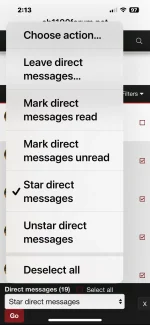
Sometimes I see post #1 as the newest, and sometimes as the oldest or vice versa..
Presently I am using my phone which is a bit more complicated than my laptop
Presently I am using my phone which is a bit more complicated than my laptop

Thread starter
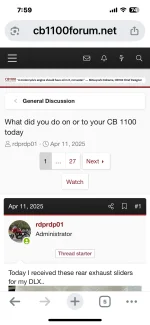
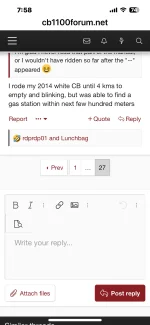
Not sure why that's happening @peterbaron. If possible, could you upload a screen shot of a thread where post #1 is at the end?
peterbaron
Road warrior
peterbaron
Road warrior
Here you areNot sure why that's happening @peterbaron. If possible, could you upload a screen shot of a thread where post #1 is at the end?
Attachments
Thread starter
Ah.
If you tap/click on the thread name you will be taken to the first post.
If you tap/click on the time & date above the username of the latest poster you will be taken to the last post in the thread.
It is the same as the MyBB platform.
Does that help?
If you tap/click on the thread name you will be taken to the first post.
If you tap/click on the time & date above the username of the latest poster you will be taken to the last post in the thread.
It is the same as the MyBB platform.
Does that help?

LucienLeFranc
Running like a top
I promise this is my last question on this topic. I'm just trying determine if the following is a bug on mobile Firefox for Android, or a fixable bug in the new system, or an unfixable feature that I should reconcile myself to:
I've tried several things, but in full screen portrait oriented photos, I cannot get rid of the greyed out banner across the bottom with the photo name, poster name, date and time.
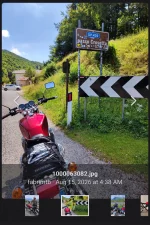
If it's just me having this issue, I'll continue fiddling with Firefox settings on my end, but if it's everyone having the issue, is it fixable?
Edit, if I long press (right click) the photo and select "open imagev in new tab" and then go to that tab, I can see the photo without the info bar across the bottom, so that's a workaround of sorts, just a few extra steps to see each photo.
Aldo, in case it is helpful, here is a link to the post where I'm seeing the info bar for each photo:
I've tried several things, but in full screen portrait oriented photos, I cannot get rid of the greyed out banner across the bottom with the photo name, poster name, date and time.
If it's just me having this issue, I'll continue fiddling with Firefox settings on my end, but if it's everyone having the issue, is it fixable?
Edit, if I long press (right click) the photo and select "open imagev in new tab" and then go to that tab, I can see the photo without the info bar across the bottom, so that's a workaround of sorts, just a few extra steps to see each photo.
Aldo, in case it is helpful, here is a link to the post where I'm seeing the info bar for each photo:
Here the exterior modifications I made on my CB '13:
- Handlebar - Renthal 755
- Bar ends - Stainless steel CNC made
- Mirrors - CB600 2004
- Turn lights - CB '14
- Rear grab - CB1100 RS '17 onwards
- Rear suspensions - Ohlins
- Slip on exhaust - Arrow
- Engine guards - Active
- Tail light - Honda XL '86[attachment=1746][attachment=1747][attachment=1748][attachment=1749]
What do you think?
- Handlebar - Renthal 755
- Bar ends - Stainless steel CNC made
- Mirrors - CB600 2004
- Turn lights - CB '14
- Rear grab - CB1100 RS '17 onwards
- Rear suspensions - Ohlins
- Slip on exhaust - Arrow
- Engine guards - Active
- Tail light - Honda XL '86[attachment=1746][attachment=1747][attachment=1748][attachment=1749]
What do you think?

Last edited:

rdprdp01
Administrator
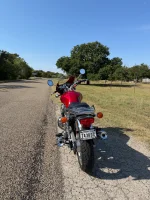
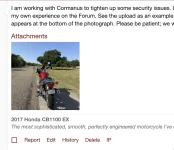
I am working with Cormanus to tighten up some security issues. Later this week, I will try to replicate the issue you documented so well. I have not seen this behavior in my own experience on the Forum. See the upload as an example. Although the name appears on the thumbnail, when you click on the picture, the file name recedes and appears at the bottom of the photograph. Please be patient; we will hopefully find a quick fix.
Attachments
Thread starter
@LucienLeFranc, sorry to disagree with the boss, but I don't thing there's a fix. This is an artifact of the way the forum software works. I wrote an explanation for you, but I realised I'd misunderstood part of the issue. I need to recharge my device so I can do more work on it.
Meanwhile, do as rdprdp01 suggests and just click/tap on the image. The added bonus of doing that is you can scroll through other pictures in the thread at the same time.
Meanwhile, do as rdprdp01 suggests and just click/tap on the image. The added bonus of doing that is you can scroll through other pictures in the thread at the same time.
rdprdp01
Administrator
Building on some work Cormanus, pdedse, and I did previously for the Thread starter designation, is this rendering of thumbnails and pictures better?
If you could click on the actual link, check it out, and share your thoughts, the three of us would be grateful.
David
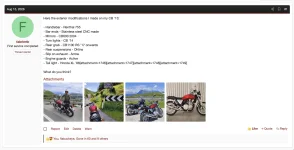
If you could click on the actual link, check it out, and share your thoughts, the three of us would be grateful.
Here the exterior modifications I made on my CB '13:
- Handlebar - Renthal 755
- Bar ends - Stainless steel CNC made
- Mirrors - CB600 2004
- Turn lights - CB '14
- Rear grab - CB1100 RS '17 onwards
- Rear suspensions - Ohlins
- Slip on exhaust - Arrow
- Engine guards - Active
- Tail light - Honda XL '86[attachment=1746][attachment=1747][attachment=1748][attachment=1749]
What do you think?
- Handlebar - Renthal 755
- Bar ends - Stainless steel CNC made
- Mirrors - CB600 2004
- Turn lights - CB '14
- Rear grab - CB1100 RS '17 onwards
- Rear suspensions - Ohlins
- Slip on exhaust - Arrow
- Engine guards - Active
- Tail light - Honda XL '86[attachment=1746][attachment=1747][attachment=1748][attachment=1749]
What do you think?
David
Thread starter
I think it looks better and takes away none of the functionality.
Thread starter
I promise this is my last question on this topic. I'm just trying determine if the following is a bug on mobile Firefox for Android, or a fixable bug in the new system, or an unfixable feature that I should reconcile myself to ...
@LucienLeFranc, keep plugging away with the questions. We all learn from them. If this makes no sense, ask again.
@rdprdp01 has removed the bottom banner and explained that, if you click on the image, you'll get a bigger view of it. When you do, you'll get the added bonus of being able to view all the other photos in that thread.
This is the thread you referenced before @rdprdp01 got at the banners.
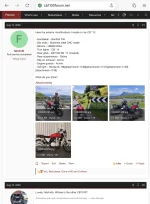
This is what happens if you click on the picture.
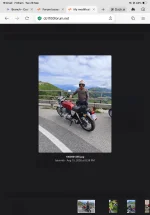
Let me now try to explain what's happening.
Here's the window for writing a post:
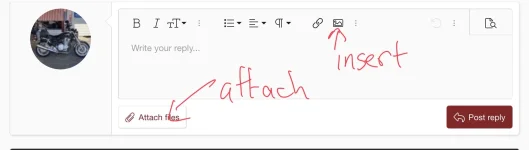
My scribbling shows two ways to get an image into the post. The first is by clicking the image button on the toolbar. Follow the steps and it will both insert the image in the place you were when you clicked the button, and also give you a thumbnail at the bottom of the screen. Like this.
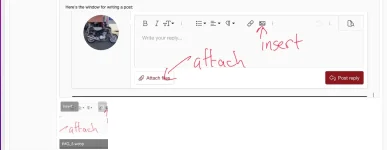
You can click on the 'Insert' button to place the image or a copy of it elsewhere in your post if you want. And now I have two thumbnails at the bottom of my posting screen.
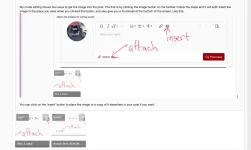
But, when I post this, all the reader will see is the images in the post in the place where I placed them.
With me so far? Good, let's turn to clicking the 'Attach files' button instead. I get a screen that looks like this:
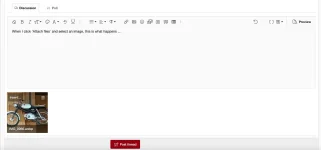
You can see that the image is not automatically inserted into the post. You can insert it anywhere you want by clicking on 'Insert...' but it's your choice.
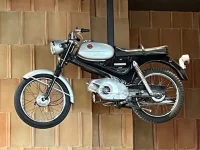
I've attached the same picture to this post and you will see it at the bottom under the heading 'Attachments'.
Summary
Inserting pictures into a thread causes them to appear in the text of the thread. Using the Attach files feature simply appends the image (or other) files to the post and shows them as thumbnails at the bottom of the post. You can view attached files simply by clicking on the thumbnail.
In fact, exactly the same thing happened in MyBB; it was just less elegantly implemented.
I hope that helps make sense of this.
Attachments
LucienLeFranc
Running like a top
Fixed! The new UI is now PERFECT! (From my perspective at least.) Thanks for your, Cormanus and the teams' stellar execution.Building on some work Cormanus, pdedse, and I did previously for the Thread starter designation, is this rendering of thumbnails and pictures better?
If you could click on the actual link, check it out, and share your thoughts, the three of us would be grateful.
Here the exterior modifications I made on my CB '13:
- Handlebar - Renthal 755
- Bar ends - Stainless steel CNC made
- Mirrors - CB600 2004
- Turn lights - CB '14
- Rear grab - CB1100 RS '17 onwards
- Rear suspensions - Ohlins
- Slip on exhaust - Arrow
- Engine guards - Active
- Tail light - Honda XL '86[attachment=1746][attachment=1747][attachment=1748][attachment=1749]
What do you think?
David
View attachment 4523
View attachment 4524

Similar threads

- Replies
- 31
- Views
- 748

- Replies
- 8
- Views
- 278
- Replies
- 12
- Views
- 589
- Replies
- 4
- Views
- 381
