Chrome Browser Trouble

peterbaron_imp said:
In the chrome address bar type in
Honda CB1100 Forum - For fans of Honda's CB1100
If it doesn't work, right click on chrome address bar and delete s from https, and then delete everything that is after .com including /
so will bring you back to
Honda CB1100 Forum - For fans of Honda's CB1100
and press enter and follow CB1100 Forum < may need to enter again
I am not computer expert, so my explanation may not look so professional

If it's fixed, in the google address bar will show you a little triangle with ! inside of it Not secure
If it doesn't work then let me know, so will provide pics?
This is how I fixed mine.
It finally worked!

One caveat, I'm not using Chrome. Chrome has always worked for me as did Firefox but my primary browser is Brave.

My issue (and perhaps others) has to do with security, in Chrome and Firefox to the left of the address bar it says "not secure" once I managed to turn off that security feature (in Brave) it displays correctly. For me it was turning off "Brave Shield".

Thanks again Peter I followed your steps and I toggled off security on this site.
 
Thread starter
Firefox does work correctly for me, but Chrome didn't. I tried something similar to what's been said. Got it to work on 3 PCs, just not my Android.

I tried this on 3 different computers, Win7, Win10, Win11

It toggled off and on in Win11, once enabled in Win7, Win10 disabling had no effect.

Click on "Not Secure" then go to Site Settings (changes only for this web page)

099a5b8572ea884f20f45ed6c1620ef3.png


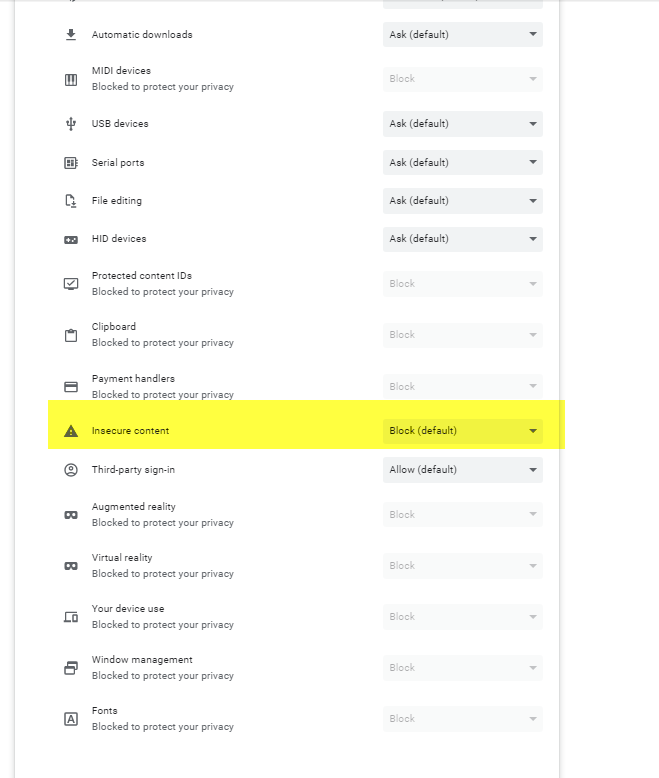
Find "Insecure Content" and turn from blocked to allowed.

When I turned back to "blocked" it disabled on the Win11, but had no effect on the Win7, Win10 and still worked corrrectly with setting turned back to block ????

828ac247269260ec3e9610c848c1a236.png
 
Thanks to all who provided advice in this thread I've been beating my head against a wall trying to get this site to render properly in my browsers. My go-to browser in Chrome. I had to set the protocol to http: instad of https:, that was the answer.
 
amacbeth_imp said:
Thanks to all who provided advice in this thread I've been beating my head against a wall trying to get this site to render properly in my browsers. My go-to browser in Chrome. I had to set the protocol to http: instad of https:, that was the answer.
In laymen's terms how does one go about setting the protocol to http?
 
The ferret_imp said:
amacbeth_imp said:
Thanks to all who provided advice in this thread I've been beating my head against a wall trying to get this site to render properly in my browsers. My go-to browser in Chrome. I had to set the protocol to http: instad of https:, that was the answer.
In laymen's terms how does one go about setting the protocol to http?
Read post #23... and the highlighted area change from block (default) to allow and then save (settings).

This is what fixed my Chrome permanently , even after erasing history+
 
Peter mine doesn't look like that when I click on it

I found site settings, clicked allow insecure stuff, reloaded settings, and it's still the same.
 
Ok, I just clicked allow secure stuff, and POOF, the site looks normal now on Chrome.
 
The ferret_imp said:
Peter mine doesn't look like that when I click on it

I found site settings, clicked allow insecure stuff, reloaded settings, and it's still the same.
Ferret, I am computer dummy as well but I never give up...often clicking on something I have no idea about ... as long as it finally works for me :rolleyes: :D
This is my Chrome browser toolbar look on MacBook Air and step by step pics, hope it helps:

4d7ea3ed0b6c0116e71321629555d7b6.jpg

ugly site look, click on cursor

4d6cd42af497452b9218477a913bef7d.jpg

will get ^this^, click cursor on site settings

7f459c7c0dfaa4027c9b107c0a5823ce.jpg

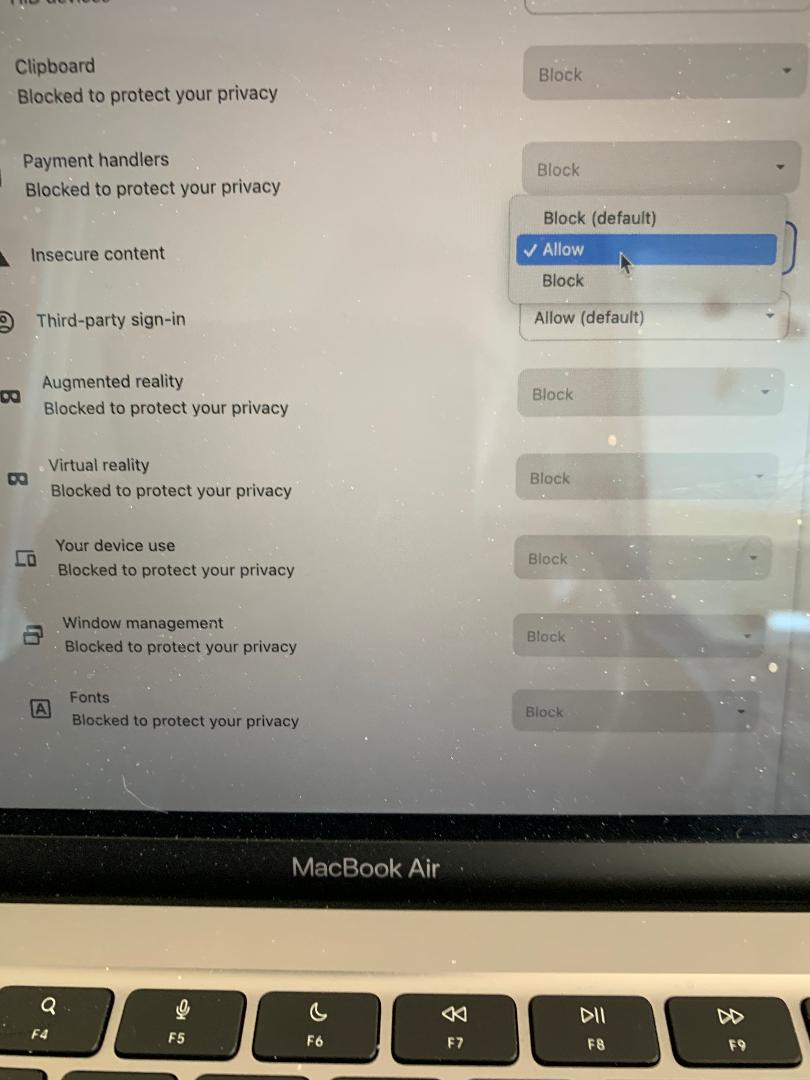
will get ^this^ and scroll down to insecure content

d14f5f3c69ab152ee51ef7928deacd42.jpg

change from block to allow

7d30eb388846690d3b85dc387da70312.jpg

will get ^this^

e9975ab05af020fca9f21f5970569784.jpg

go to your CB button/icon that you normally click on and click to reload
Mine looks like that, yours may very, but same idea

cace0b991be179b3284a36f6b8faeb87.jpg

..and finally you should get ^this image^

+
:
:
:
97337ad1abb6cedf85a508482e551e24.jpg

THIS IS your bonus :P:rofl:
 
I've clicked on so much stuff to no avail. Apparently each page has it's own https setting.
 
I'm just talking about the "ugly" CB1100 forum page that's supposed to be displayed first, nothing more.
Sorry I couldn't help you.
 
peterbaron_imp said:
The ferret_imp said:
Peter mine doesn't look like that when I click on it

I found site settings, clicked allow insecure stuff, reloaded settings, and it's still the same.
Ferret, I am computer dummy as well but I never give up...often clicking on something I have no idea about ... as long as it finally works for me :rolleyes: :D
This is my Chrome browser toolbar look on MacBook Air and step by step pics, hope it helps:

4d7ea3ed0b6c0116e71321629555d7b6.jpg

ugly site look, click on cursor

4d6cd42af497452b9218477a913bef7d.jpg

will get ^this^, click cursor on site settings

7f459c7c0dfaa4027c9b107c0a5823ce.jpg

will get ^this^ and scroll down to insecure content

d14f5f3c69ab152ee51ef7928deacd42.jpg

change from block to allow

7d30eb388846690d3b85dc387da70312.jpg

will get ^this^

e9975ab05af020fca9f21f5970569784.jpg

go to your CB button/icon that you normally click on and click to reload
Mine looks like that, yours may very, but same idea

cace0b991be179b3284a36f6b8faeb87.jpg

..and finally you should get ^this image^

+
:
:
:
97337ad1abb6cedf85a508482e551e24.jpg

THIS IS your bonus :P:rofl:
... wha tha? ...
 
Back
Top