Today's Posts

pekingduck

Road warrior
Thread starter
We don't always get to look at the Forum every day, so new posts or threads are often missing after 24 hours from last post, and unless you remember the thread's exact name, you may not be able to find them.

I think they should stay up for several days, maybe a week.  That would encourage more interaction.  Maybe title it as 20 Latest Posts, or This Week's Posts.
 
I have often felt the same way.

Another forum I use has a "What's New" button.  It takes me to a list of the ten newest posts, with those I haven't read in boldface.  I can also click "View more" at the bottom of the list to show the next ten newest.  And so on, to include the past 30 days of posts.  I find it is so useful, it has become my go-to method of reading that forum.

I think I miss a lot of posts here whenever I'm absent for more than a day.  Although there is a "Recent Posts" sidebar, it seems limited.
 
Thanks for the suggestion.

Can you tell me whether you're using the "View Today's Posts" page or the "View New Posts" page? I think the latter should retain unread post data for 7 days.
 
The "Recent Post" column that displays on the right side of my screen (but at the bottom on my phone) does not reset every day. It shows the last 8 posts.
 
On my last post, I was not very accurate.  I said "ten newest posts," but what I really meant was "ten threads with the most recent posts."

I think the limitation of usefulness of the "Recent Posts" sidebar is partly because multiple posts on each thread are displayed there, so the total number of threads displayed is often very low.  Often it is less than a day's activity, so it doesn't help the person catch up if they have been away for more than a day.
 
Lunchbag, do you use either of the links at the top of the page to "View New Posts" or "View Today's Posts"?
 
Cormanus said:
Lunchbag, do you use either of the links at the top of the page to "View New Posts" or "View Today's Posts"?

I do.  They work well if I check it every day.  I think my issue is the same as what pekingduck reported.  If I'm away from the forum for a few days, the "View New Posts" and "View Today's Posts" options don't capture those that are older than ~24 hrs.  Same with the "Recent Posts" sidebar.
 
aren't the threads you haven't read recently in dark red and the ones you have read in light red?
 
I believe the Forum uses a 24 hour refresh for the settings. It operates independent of who is logging in. If you would like me to explore the possibility of modifying it to be Member aware, I can. Please let me know what is best. If it is not built into the widget, we will have to create some custom code. David
 
Lunchbag said:
Cormanus said:
Lunchbag, do you use either of the links at the top of the page to "View New Posts" or "View Today's Posts"?

I do.  They work well if I check it every day.  I think my issue is the same as what pekingduck reported.  If I'm away from the forum for a few days, the "View New Posts" and "View Today's Posts" options don't capture those that are older than ~24 hrs.  Same with the "Recent Posts" sidebar.

As EmptySea has pointed out, the Recent Posts Sidebar just captures the most recent posts, even if they're all in one thread. The "View Today's Posts" does what it says; but, I think the "View New Posts" should show you all the posts that have been updated in the past 7 days.
 
[quote="emptysea" pid='271465' dateline='1760993519']
The "Recent Post" column that displays on the right side of my screen (but at the bottom on my phone) does not reset every day. It shows the last 8 posts.
[/QUOTE]

That may be related to having a "cached" version of the page in your browser. Do you see the same behavior if you "refresh" so that a new feed can be pushed from the Forum Server to your device? Please let me know when you have time to check. Have a great week. David
 
Lunchbag said:
Cormanus said:
Lunchbag, do you use either of the links at the top of the page to "View New Posts" or "View Today's Posts"?

I do.  They work well if I check it every day.  I think my issue is the same as what pekingduck reported.  If I'm away from the forum for a few days, the "View New Posts" and "View Today's Posts" options don't capture those that are older than ~24 hrs.  Same with the "Recent Posts" sidebar.

That may be related to having a "cached" version of the page in your browser. Do you see the same behavior if you "refresh" so that a new feed can be pushed from the Forum Server to your device? Please let me know when you have time to check. Have a great week. David
 
If it helps, my preliminary research suggests that "View New Posts" generates a search which results in a list of all threads posted or updated within 7 days of the last time that user logged in. Threads the user hasn't read will be in a bold typeface.

Note: if you log in and log out and then log in again without reading any of them, the search will return nothing as it is only looking for things that are new since you last logged in.

I'll check over the next couple of days, but I suspect that, if you stay logged in, the search will return a longer list.
 
Thank you, Cormanus, for investigating. Let me know if I need to engage in any way or lend a hand researching. David
 
Cormanus said:
Note: if you log in and log out and then log in again without reading any of them, the search will return nothing as it is only looking for things that are new since you last logged in.

I'll check over the next couple of days, but I suspect that, if you stay logged in, the search will return a longer list.

Since I only log in at work, I can confirm the "View new posts" will return a list of all new posts/threads since last log in. Not sure if there is a max time limit however, most I am gone for is just the weekend between logins.
 
rdprdp01 said:
Lunchbag said:
Cormanus said:
Lunchbag, do you use either of the links at the top of the page to "View New Posts" or "View Today's Posts"?

I do.  They work well if I check it every day.  I think my issue is the same as what pekingduck reported.  If I'm away from the forum for a few days, the "View New Posts" and "View Today's Posts" options don't capture those that are older than ~24 hrs.  Same with the "Recent Posts" sidebar.

That may be related to having a "cached" version of the page in your browser. Do you see the same behavior if you "refresh" so that a new feed can be pushed from the Forum Server to your device? Please let me know when you have time to check. Have a great week. David

Refresh doesn't seem to change things.  Based on the comments others have made, I may not understand how the "View New Posts" actually works.  Will add more if I figure out anything helpful.


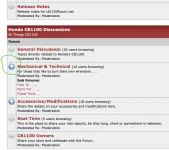
One feature I just discovered is the blue arrows (see screenshot).  I never noticed them before, but they appear to identify any recent posts which I haven't yet read, including ones which don't show up in the "View New Posts" list.  I may start using these to help me navigate to the new stuff.  Still figuring it out...

[attachment=859]
 

Attachments

  • Screenshot 2025-10-21 at 1.30.30?PM.webp
    Screenshot 2025-10-21 at 1.30.30?PM.webp
    79.5 KB · Views: 58
Thread starter
I wonder if  "Recent Posts", "View Today's Posts" page and the "View New Posts" couldn't be somehow combined, as they largely overlap.  If there were an option, perhaps.

Maybe have the last week's worth, for example, with the last week's posts at the top, and the unread highlighted.  Sometimes I read something, and want to come back to it a couple days later, either to re-read, or after researching something a bit.
 
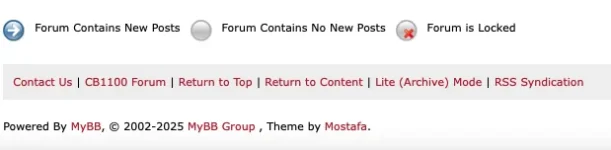
Lunchbag, you're quite right about the blue icon. See the explanation of the different colours at the bottom of the main page.

[attachment=860]

If you open the forum with new posts, any thread containing new posts will display in bold and will have a green, right-pointing arrow at the start of the thread title to show there are new posts. Threads with new posts will also be sorted to the top of the page.

[attachment=861]


Pekingduck, I'm still looking at your request. There's no easy fix in the forum software, but it may not be as complex to resolve as I first thought.

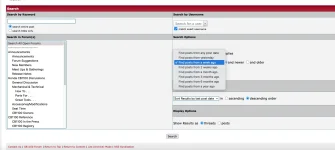
Meanwhile, if you want to find all the threads that have been either added or updated in the time since you last logged in, the quickest way I can find is:
  1. Go to the Forum's search page;
  2. In the 'Search options' box on the right side of the page, select the period for which you want to recover posts (see picture below);
  3. press the 'Search' button. You do not need to use a search term for this to work.

[attachment=863]

  • At the bottom right of the screen in 'Display Options', 'Show Results as' threads to generate a list of threads that have been added or updated. Any threads that contain a post less than a week old and that you haven't read will be highlighted — see the picture above.
  • Change 'Show Results as' to 'posts' you'll get a list of every post made in the period you selected. If you know what thread you're looking for and who made the post you're interested in, that may be a better option, but it will generate a lot more results and will not highlight new posts.

Hope at least some of that helps.
 

Attachments

  • Screen Shot 2025-10-22 at 10.50.32 am.webp
    Screen Shot 2025-10-22 at 10.50.32 am.webp
    9.4 KB · Views: 51
  • Screen Shot 2025-10-22 at 10.56.23 am.webp
    Screen Shot 2025-10-22 at 10.56.23 am.webp
    31.5 KB · Views: 53
  • Screen Shot 2025-10-22 at 11.12.30 am.webp
    Screen Shot 2025-10-22 at 11.12.30 am.webp
    44.1 KB · Views: 54
I hope the change made to the Forum today will respond to this request from members.

In what is called the "Welcome Bar" which appears under the banner at the top of the screen there has been a change. It now reads:

"View Posts: New | Today's | Past 7 Days | Private Messages"

See screenshot —

[attachment=894]

  • New returns a list of threads that have been updated AND are less than 7 days old since the member last logged on — I'm not completely clear about how this works as what is returned seems to be affected by logging in on different devices.
  • Today's returns a list of the threads posted or updated today
  • Past 7 Days returns a list of threads that are either new in the past 7 days or have had new posts made to them in the past 7 days. If the title of the thread is shown in bold, it means there are posts you have not read. If there is no bold type face, it likely means there are no recent posts you haven't read.

See the screenshot below where I've circled the link to produce this new list.

[attachment=895]
 

Attachments

  • 251103-Revised Welcome Bar.webp
    251103-Revised Welcome Bar.webp
    24.2 KB · Views: 35
  • 251103-Revised Welcome Bar-2.webp
    251103-Revised Welcome Bar-2.webp
    25 KB · Views: 36
Back
Top