Photobucket picture hosting changes

Thread starter
Retsel_imp said:
Okay, I am on my android tablet running Taptalk. I select the "Quick response" at the bottom of the screen and there is an up ^ arrow to the right. I select that and it takes me to the photos I took with this tablet or the ability to take a new photo and it seems to upload with no resizing. Is this because I'm using Tapatalk? It seems to be new.
468e4619610aecc17c2631e5aaf8b534.jpg


Sent from my SM-T710 using Tapatalk
Tapatalk hosts the photo on another server automatically. Yours is located at uploads.tapatalk-cdn.com
 
Cormanus_imp said:
And Stichill has just—inadvertently probably—demonstrated the great irritation of uploading images directly to the forum: there is no way easily to control the dimensions of the image. Even if the file size is small, pictures can be enormous and dominate the screen to the point where it's hard to read the text. Guth has somehow set things up so linked images remain a manageable size.
Ha ha! True! Once I saw that it displayed full-res, I couldn't figure out how to get rid of the attachment or set the display size.
 
It's fine to link to the picture, but the beauty of Image hosting sites like Photobucket (previously) and Postimage is that they allow you to embed a link to the image in your forum post and the forum software then displays the photo in the post. You have the option to follow the link if you want. Just posting a link means you have to follow it to look at the picture.

I haven't tried very hard, but I haven't found a way to link to images in Dropbox in a way that they'll display in the forum. Same with Google Photos.
 
I don't know if it's just on my ipad, but if I touch the PB image, the real image comes up. DOes that work for anyone else?
 
Do you mean it appears in the forum post, or does it take you to Photobucket and show you the image? It does that for me.
 
Yes takes me to photobucket and shows me the image. At this point at least, it appears the images can still be seen at least.
 
I suspect that will continue to be the case. They just won't allow embedding in forums which is a pity as it's what's been the most useful attribute of the site. I gave up on Photobucket a while ago as I got sick to death of the advertising and ow slow the site had become. I'm too mean to pay the cost of membership.
 
It works, but it's sideways.
 
offroadfx4_imp said:
Got imgur to work.

This host has been around a long time....hopefully it will be for a while.

Here are the instruction to post into a forum.

https://webapps.stackexchange.com/questions/95883/how-to-get-direct-link-of-images-on-imgur

Use Alternative 3 ....copy the BBCode (Forums) and paste into the forum post

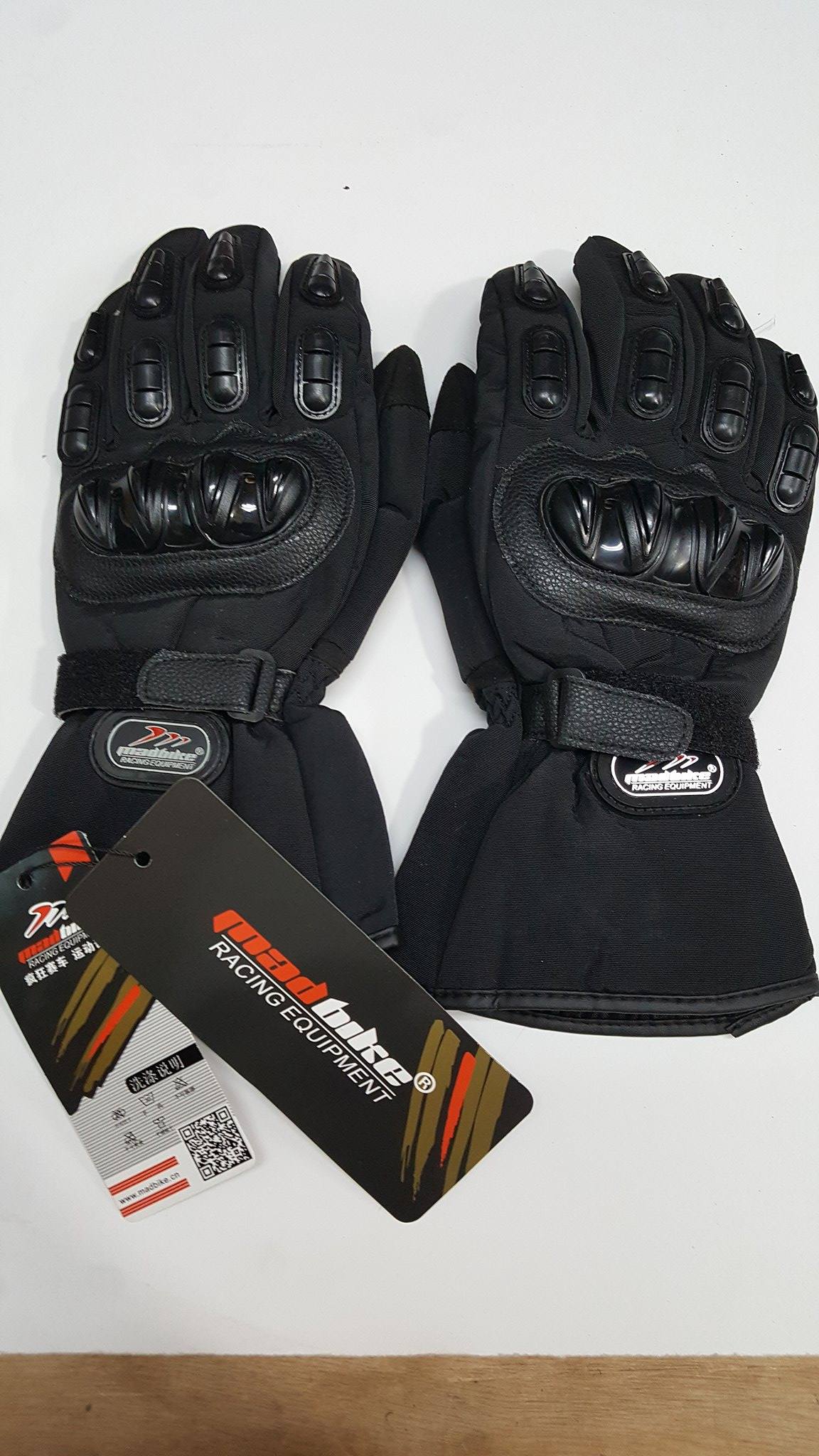
This is a photo of my $20 rain proof gloves I just got from Amazon...hope they work, they feel pretty good.

https://www.amazon.com/gp/product/B012CE...UTF8&psc=1


Geez you techie guys. I read the whole thing and Im pretty sure it was in Russian or some other foreign language. No way I'm figuring that out.

Offroad how about doing a tute in English
 
Ferret, is there no way the forum site can automatically resize an attachment to 250K? If we were to all do attachments would that eat up the sites allocated memory? I'm not sure if I'm asking the right question there
 
Geez, Ferret. I think it's pretty straightforward.
[li]Get yourself an IMGUR account.[/li] [li]Upload a photo or two.[/li] [li]When you have done step 2, right-click on the image and from the menu select "Open image in new tab" when it opens, select and copy the URL.[/li] [li]Use that URL in the forum.

OR[/li] [li]Right click on the image you uploaded in step 2 and select "copy image address".[/li] [li]Use that URL in the forum.

OR[/li] [li]Look up in the top right hand corner above the image you uploaded in step 2. There should be a little down arrow. Click on it and select "get share links".[/li] [li]One of the options in Share Links is "BB Code (Forums)". Copy that and paste it into your post on the forum.
[/li]
The third option seems the best to me as you won't have either to go to the 'New reply' section of the forum and use the 'insert image' button or remember to insert the IMG tags around the URL you pasted in.

Does that help a little?

Frulk_imp said:
Ferret, is there no way the forum site can automatically resize an attachment to 250K? If we were to all do attachments would that eat up the sites allocated memory? I'm not sure if I'm asking the right question there
Frulk, Guth will have to answer the question about resizing images. On the second question, you're right that, if we all uploaded images directly to the forum, it would gobble up storage which Guth is currently paying for. I'm not sure he wants that.

As I've mentioned before, there also seems no way for the forum software to control the dimensions of uploaded images meaning you often get those enormous images that shrink the text on that page to the point of unreadability.

 
Thanks Cormanus. I'll give IMGUR a try. OK, seems to be working just need to figure out a couple more things. This was taken two weekends ago with the bike sitting directly on the Oregon trail a few miles west of South Pass Wyoming with the Wind River Mountains in the background. Coincidentally I'm also parked right on the Continental Divide at about 7,600 feet


996f3659bbed8a23701512275df21775.jpg
 
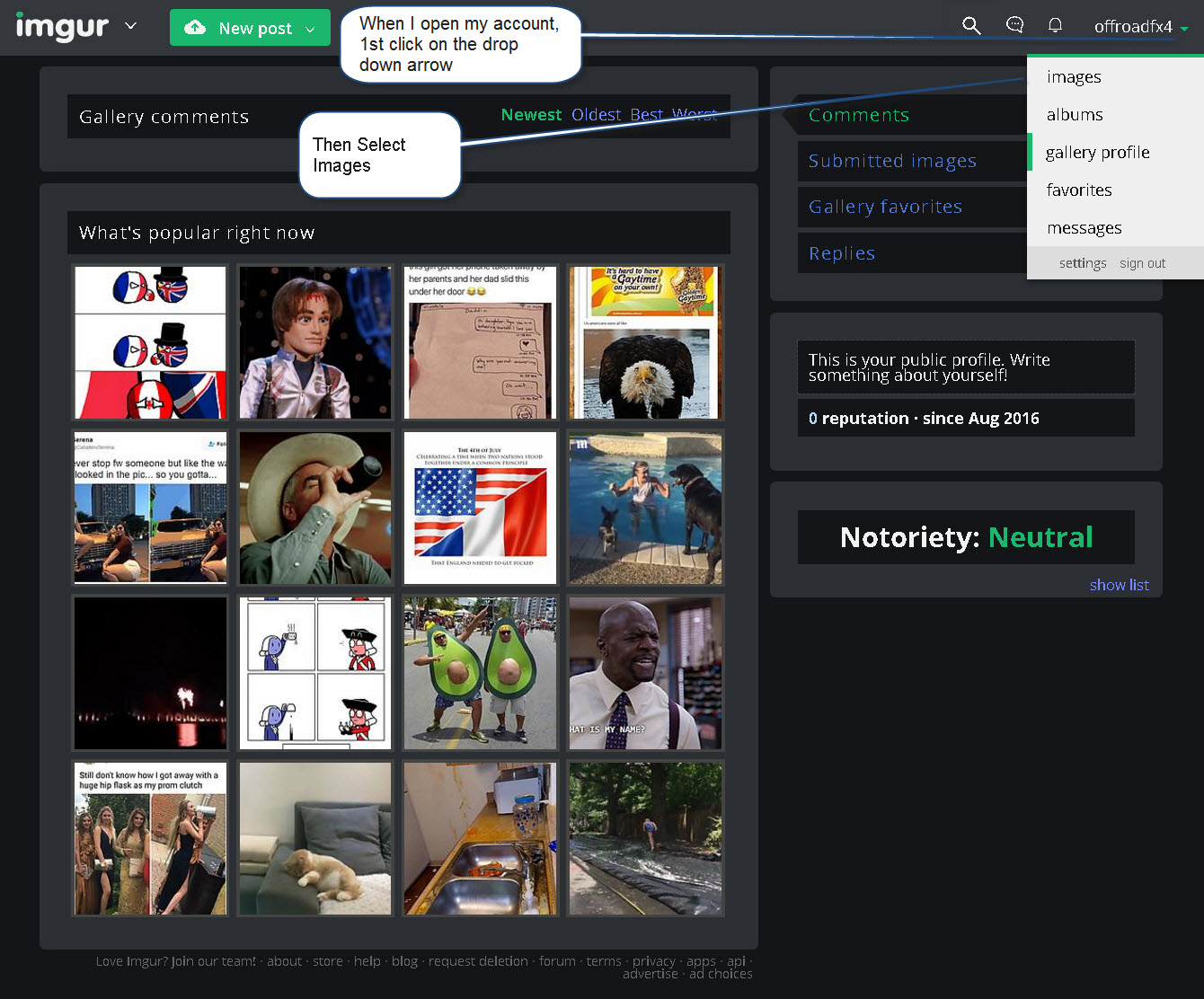
Here are some screen captures to use imgur...very similar to photobucket except instead of copying the 'IMG" link you copy the "BBCode" link.

Create an account and login in, click on the drop down arrow and select images

2197b8bbb952a6fa7aaa6ab9d4ffd238.jpg


Then click on add images:

4b2289facd47a044cfaac058c39ecbb5.jpg


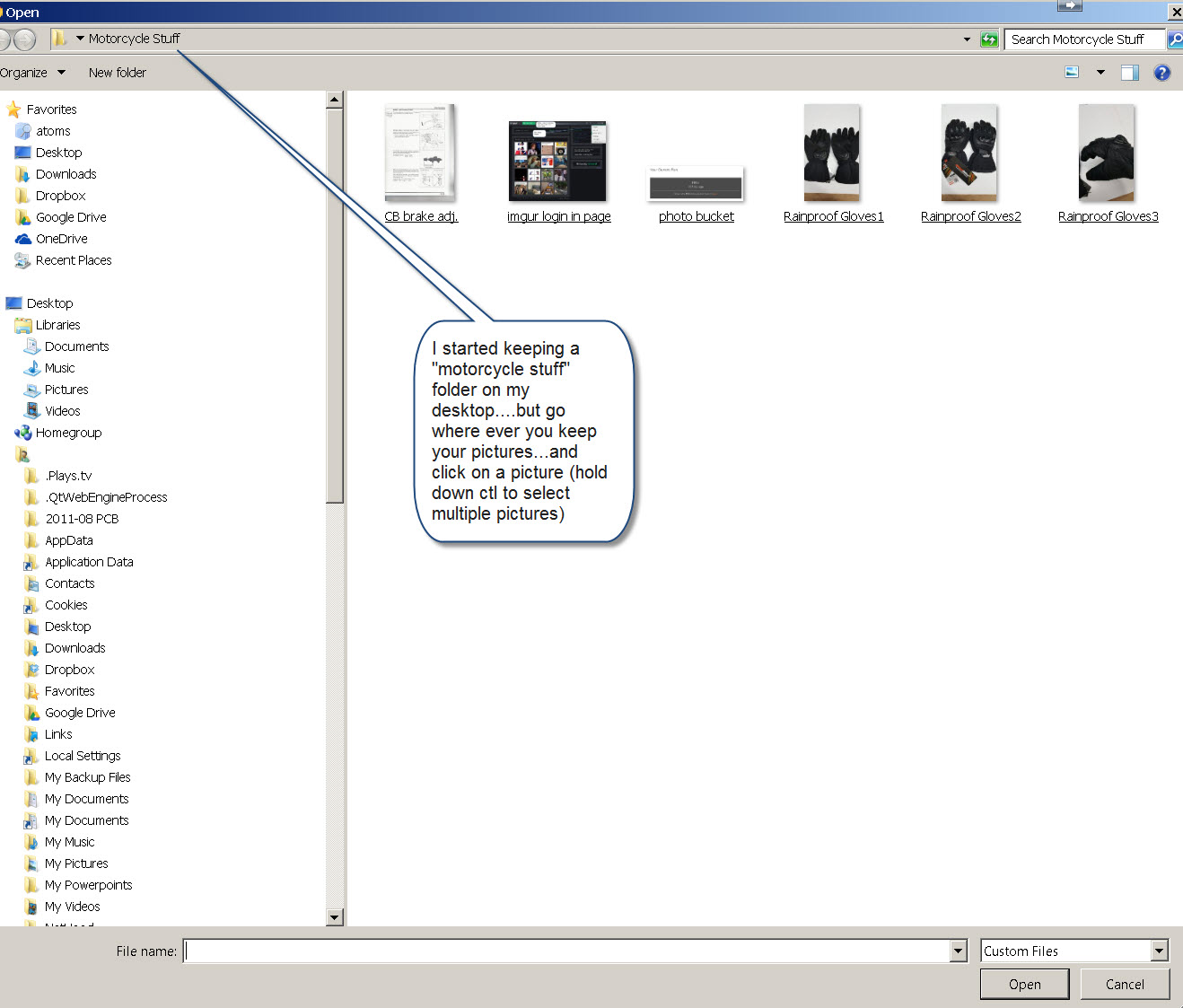
Then go to wherever you keep your pictures on your computer...

3439313ea999cdb22edbeeb91e5a07c3.jpg


.I made a motorcycle on my desktop so it's easy to find:

89ddc3e7154ffdcd7094b55d0e3e6075.jpg


It seems to upload MUCH quicker than photobucket, then you can see it in your library and click on it.

ecd6e1153ee7f813c4ad5f92230389d4.jpg


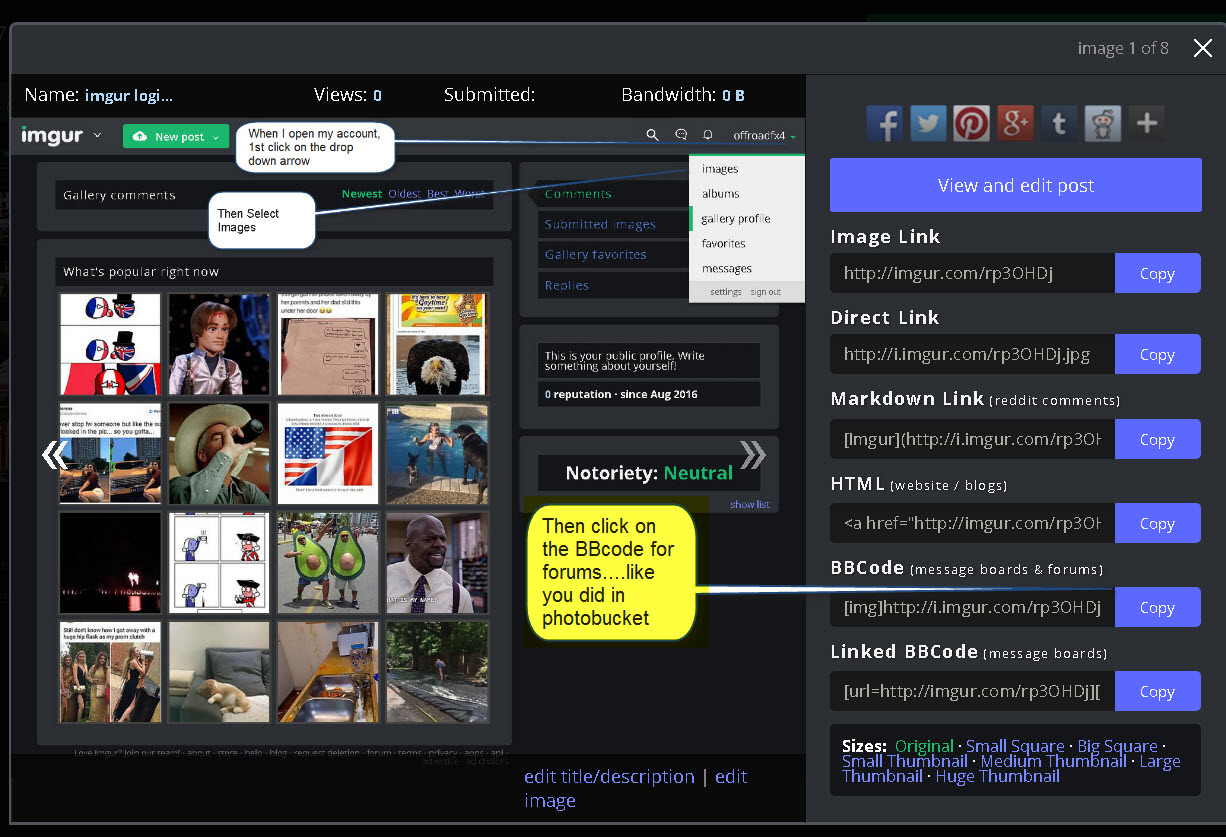
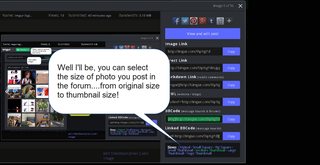
Then click "copy" by the BBCode for forums link

16f971a27e5faa9f19a7af67ae9c4a5c.jpg


This is similar to the IMG link you copied in photobucket...see next pic

f17f33aa42e08597eefa1c07a9b42054.jpg


Then go paste it into the forum like you did for photobucket.

imgur seems to offer unlimited storage....one warning, if you click on a picture to "enlarge" to go to imgur web site and there is advertising
b0a833d339fee4e4751e5e98bfcb498a.jpg


I'm not sure if these are too big....the last one was 67kb?


[url=http://imgur.com/o7Q1Z1Y]

[url=http://imgur.com/o7Q1Z1Y]
 
When I get some time I will have to sit down and play. I barely have the skills to be a moderator. Still cant figure out how you change a link into a one red word "here" like you do Cormanus, or to make those cool maps like you do.
 
Great tutorials, Cormanus and offroad. One for the written learner and one for the visual learner. Might still need one for the ferret learner. :P

One comment about imgur: it's associated with the reddit website which is pretty much no-holds-barred internet anarchy. I usually exit the imgur landing page right away...some content is distracting and amusing and some is...weird.

I have my imgur account set to keep my posts private but the neat thing is that direct links to the images work publicly.
 
Back
Top